Ordering, operations, and delivery

Run direct ordering
from one platform.

Culin includes a customer ordering app, a kitchen control centre, an admin dashboard, and a rider app.

Admin dashboard
Culin admin dashboard showing revenue, orders, customers, and kitchen performance
Branded Culin customer app showing restaurant categories and menu items
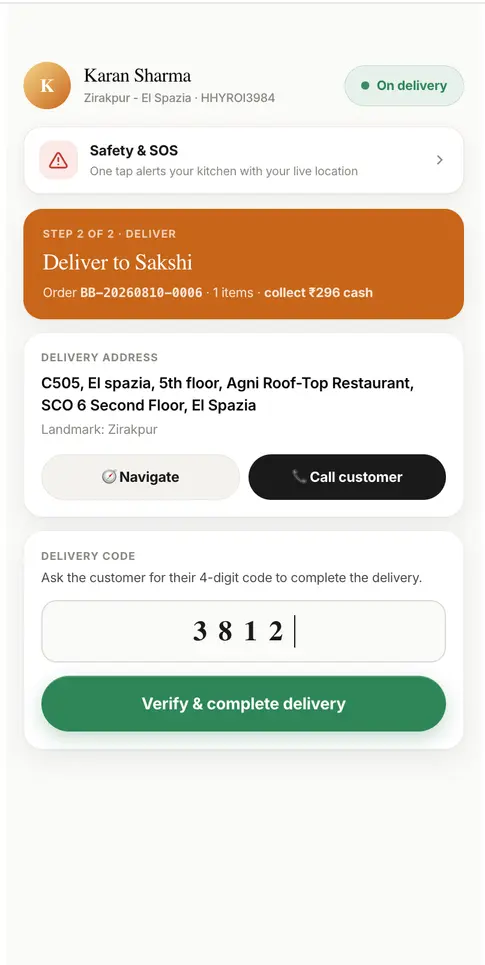
Culin rider app showing delivery details and OTP confirmation
Customer
Kitchen
Rider

01 / Customer experience

Your restaurant.
Your app.

Customers can browse your menu, customise items, pay, and track delivery in an app designed around your brand.

  • Custom visual theme and navigation
  • Rich menus, portions, add-ons, and upsells
  • Addresses, coupons, tips, and payments
  • Live order status and rider tracking
  • Ratings, reviews, profiles, and support
Customer app demo

02 / Kitchen operations

Every order, clear
and on time.

New orders appear on a live board with preparation timers, instructions, and clear pickup status for the kitchen team.

  • Live kanban order board
  • Order instructions and prep timers
  • Ready and rider handoff states
  • Menu availability controls
  • Revenue, prep-time, SLA, and ratings analytics
Kitchen demo

03 / Business control

Manage every location
from one dashboard.

Update menus and promotions, manage teams, review finances, and compare performance across your business.

  • Live business dashboard and audit logs
  • Menu, pricing, inventory, and promotion control
  • Kitchen, rider, customer, and team modules
  • Finance and downloadable reports
  • Demand, repeat-rate, SLA, and dish analytics
Admin dashboard demo

04 / Last mile

Everything riders need
for the next delivery.

Riders can accept jobs, navigate to pickup and drop-off, contact customers, and confirm each delivery securely.

  • Available delivery and earnings view
  • Maps navigation for pickup and drop-off
  • Customer calling and live tracking
  • Delivery OTP verification
  • Profile, duty status, and SOS tools
Rider app demo

How the products work together

Each team sees
what it needs.

Browse, pay, and trackCustomer app
Accept, prepare, and hand offKitchen control
Collect, navigate, and deliverRider app
Manage, measure, and improveAdmin dashboard

How rollout works

Set up for the way
you operate.

Before launch, we agree the locations, modules, integrations, responsibilities, and support your team needs.

01

Brand and menu setup

We configure your app theme, locations, menus, offers, and the Culin modules included in your plan.

02

Payments and services

Payment gateways, maps, messaging, notifications, and app-store publication are selected for your market.

03

Roles and permissions

Give team members access to the right brands, locations, and day-to-day management tools.

04

Data and integrations

We document agreed reporting, data, API, and integration requirements as part of your rollout plan.

Your proposal includes the launch scope, responsibilities, third-party costs, service terms, and support included with your plan.

Sell direct with Culin

Your brand. Your orders.
One platform.

Launch a branded ordering app with the tools to manage kitchens, riders, and every customer order.